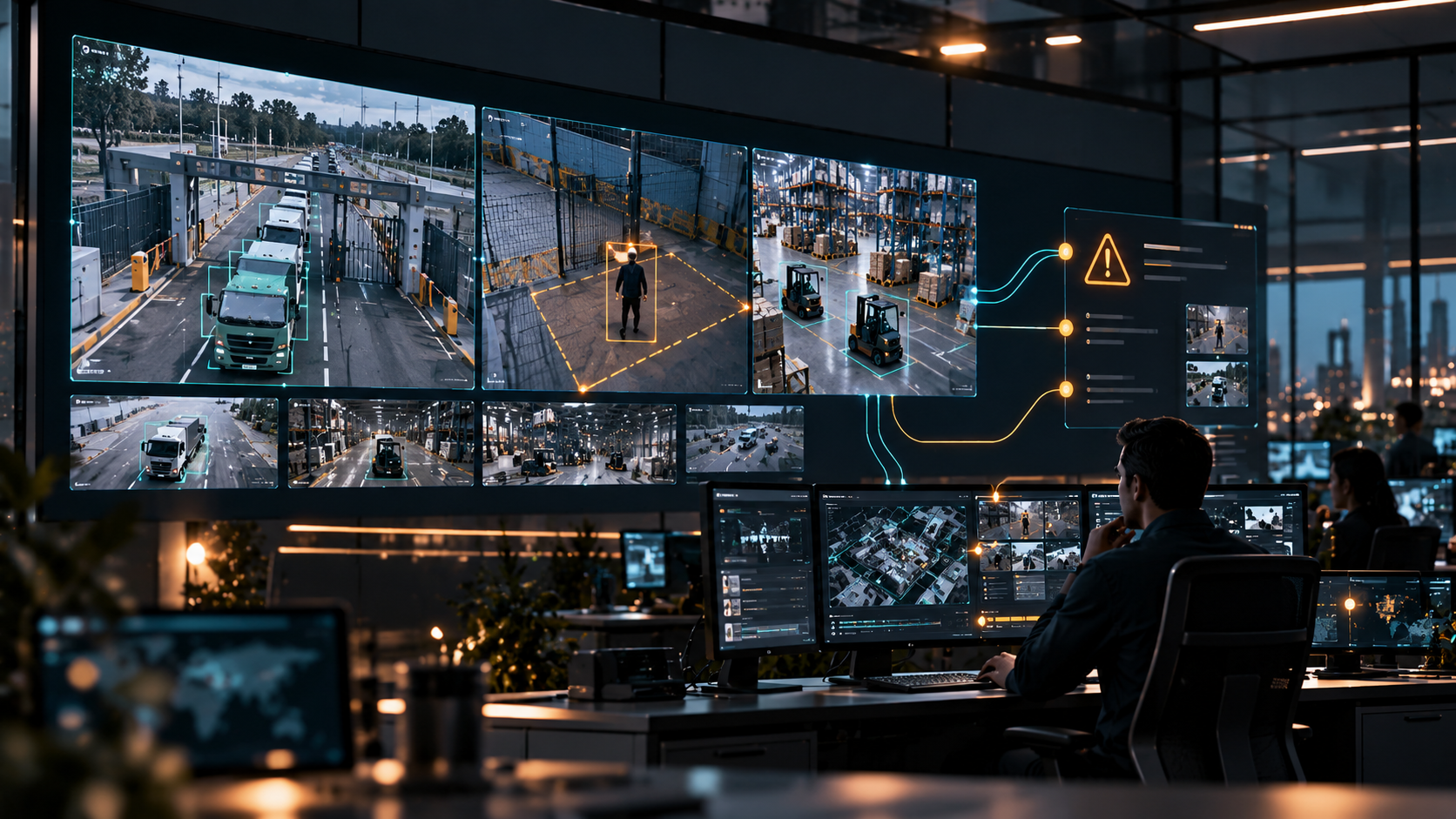
From Video Detection to Operational Response
Learn how Usetech Launch turns video analytics into operational response through event detection, alert routing, workflow integration, and use-case adaptation.
A practical guide to Launch
A camera identifies a person entering a restricted area, a queue building at a gate or visible smoke. The next step determines the operational value: someone needs to understand the event, verify it and take the appropriate action.
Video analytics implementation therefore starts with a process. Teams need to define what matters, which conditions make it actionable and who owns the response. Camera connectivity, model performance and alert routing must support that process before it can become part of everyday operations.
Launch provides a platform foundation for analysing video, generating events and delivering alerts and analytics. A customer solution combines that foundation with configuration, model adaptation and, where necessary, additional development. The implementation scope depends on the operational task and the conditions at the site.
Regional deployments connect video with operational decisions
Recent deployments in Saudi Arabia and the UAE show how camera networks are being connected to operations teams. During Hajj 2026, Saudi Arabia’s Sawaher platform used more than 5,000 cameras across 80 locations, supported by 31 dashboards. It linked camera networks with operations rooms to analyse crowd movement and support decisions as conditions changed. Source: Saudi Press Agency, 30 May 2026.
In May 2026, Abu Dhabi’s Integrated Transport Centre described a Central Traffic Management Platform integrating more than 1,500 surveillance cameras alongside vehicle sensors and traffic lights. Its design connects automated event monitoring with data analysis and the activation of response plans. Source: Abu Dhabi Mobility, 15 May 2026.
These are large, integrated public-sector systems with their own technologies and operating environments. For an enterprise or facility team, the relevant design principle is to define how a detected condition becomes a decision or response. The same question applies when the initial scope is one gate, one production area or a small group of cameras.
Define the operational event before choosing a model
Recognising an object and defining an incident are different tasks. A person in a camera view may be entirely expected. The actionable event might be a person entering a particular zone outside permitted hours.
Start with the event definition: the object or condition, location, timing, threshold and exceptions. Then specify what the operator should do. The examples below illustrate how a visual signal can support an operational workflow; each requires validation for the intended site.
| Scenario | Event to define | Operational response to agree |
|---|---|---|
| Restricted-area intrusion | A person or vehicle enters a defined zone during restricted hours. | Route the alert to security for verification and action under the site’s procedure. |
| Visible fire or smoke | A visual pattern consistent with fire or smoke appears in a monitored area. | Notify the designated operator for verification and the agreed incident response. |
| Queue monitoring at a gate | Queue length exceeds an agreed threshold in a defined area. | Notify the operations team to assess the congestion and decide whether to adjust the process. |
This specification gives the implementation team a basis for selecting a model, configuring rules and assessing whether additional training or development is needed.
Connect detection to a response owner
The operational chain contains several distinct steps. Video provides the input, a model identifies relevant features, event logic applies the agreed conditions and an output reaches the responsible team.
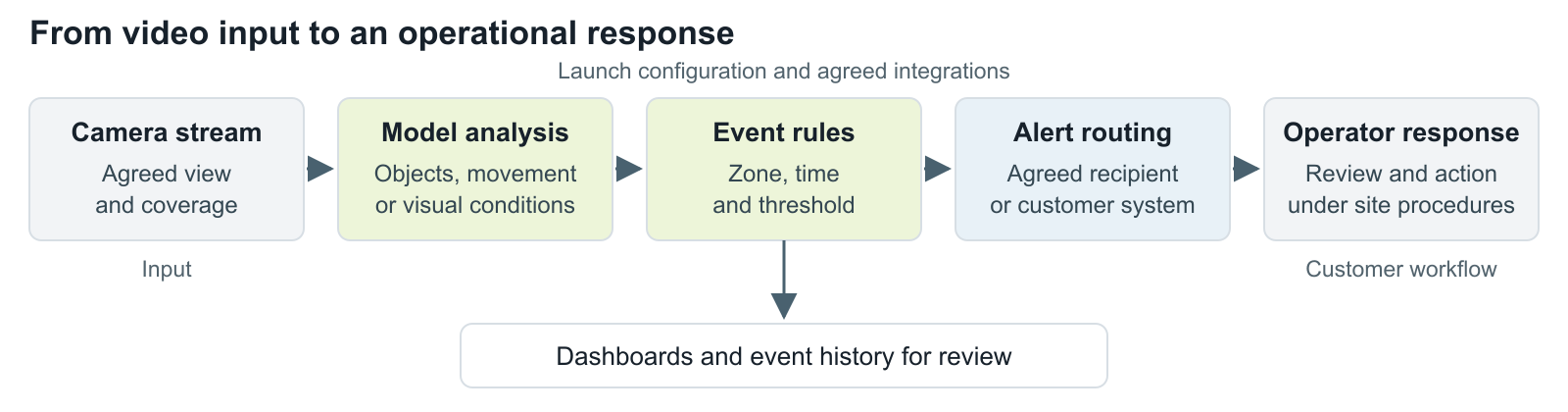
Figure 1. A video analytics workflow connects detection with an agreed response process. Alert delivery and downstream integration require project-specific configuration; the customer defines operational responsibility.
Alerts, dashboards and event history serve different purposes. An alert draws attention to a current event. A dashboard helps a supervisor review activity and patterns. Event history supports investigation and follow-up. The project should specify which outputs are required and how they will be used.
Launch can deliver analytical outputs into customer systems through agreed integrations. The implementation needs to define the destination, relevant event information and ownership of the next action. Automated downstream actions require their own scope and acceptance criteria.
Choose the implementation scope around the use case
Launch provides reusable platform services. The amount of work beyond the foundation depends on how closely the requested scenario matches existing components and on the quality of the available video.
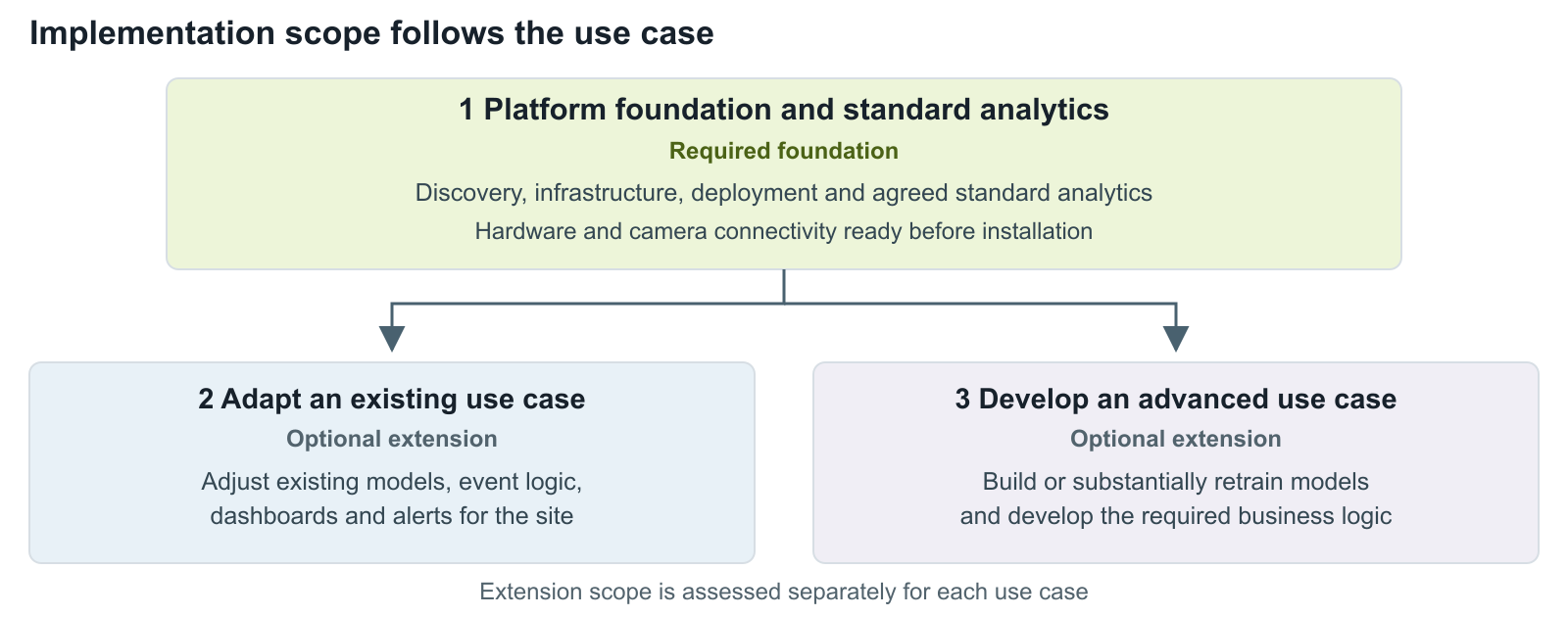
Figure 2. The platform foundation can be used on its own or extended through adaptation or advanced development, according to the agreed scope.
Platform foundation and standard analytics. Discovery establishes the priority scenario, camera streams, users, success criteria and architecture. The hardware environment and camera connectivity must be ready before installation. The team then deploys Launch, configures access and activates the agreed standard analytics, including zones, thresholds, event rules, alerts and reporting. Validation and user training complete the handover.
Adaptation of an existing use case. A scenario may need changes to object classes, tracking, thresholds or event logic, with limited calibration or retraining. Representative customer samples help establish what normal and exceptional situations look like. Dashboards and alerting also need to fit the users and their workflow.
Advanced use-case development. A new or substantially extended scenario can require a dedicated dataset, model development and additional analytical or business logic. Combining video indicators with business information for an operational decision belongs in this category when it exceeds the existing components. Feasibility and delivery scope need a separate assessment.
The starting portfolio includes scenarios such as restricted-area intrusion, fire and smoke detection and vehicle counting. Availability and suitability of the selected models should be confirmed during discovery. A portfolio of possible applications does not mean every scenario is ready for every camera or environment.
Deployment time depends on readiness and scope
Installation is one milestone within implementation. Preparing hardware, connecting cameras, configuring analytics and completing customer acceptance all affect when a scenario can become operational.
The following preliminary estimates distinguish those activities. They are planning inputs to confirm for the project, rather than a guaranteed delivery schedule.
| Work activity | Indicative duration | What the estimate covers |
|---|---|---|
| Discovery and solution design | 1 week | Priority scenario, cameras, users, success criteria, architecture and infrastructure sizing. |
| Infrastructure and connectivity | 1–2 weeks | Provisioning the required environments and establishing camera connectivity. |
| Platform installation and configuration | Up to 1 week | Deployment, camera connections, access and standard platform services, once the environment is ready. |
| Standard analytics activation | Up to 2 weeks | Configuration of standard models, zones, thresholds, event rules, alerts and reporting for selected streams. |
| Foundation validation and handover | Up to 2 weeks | Customer testing, tuning and training of operational users. |
| Adaptation of an existing model and logic | 2–4 weeks per use case | Model and scenario adaptation. Use-case definition, sample preparation, dashboards, integration and release are separate activities. |
| Advanced model and workflow development | 4–6 weeks or more per assessed use case | Development or substantial retraining and the required analytical and business logic. Dataset preparation, integration and pilot validation are additional activities. |
These estimates should not be added mechanically: the project plan must identify dependencies and any activities that can overlap. Equally, the model adaptation estimate should not be presented as the duration of the complete project. Data availability, camera coverage, integration access and customer acceptance can materially change the schedule.
Validate the complete operational chain
A useful pilot tests what happens after detection as well as whether the model recognises the relevant condition. Agree the acceptance criteria before configuration and testing begin.
The review should cover:
- Detection quality: relevant events found, missed events and false alerts, assessed against a labelled sample or agreed review process.
- Site conditions: performance across the camera views, lighting and operating situations included in scope.
- Alert delivery: whether the right information reaches the right destination within the agreed time.
- Operator workload: whether the team can review and act on the volume of alerts generated.
- Operational follow-through: whether the agreed response and any downstream integration work as intended.
Targets should reflect the specific scenario. The costs of a missed event and a false alert differ between a gate queue and a safety incident. A single accuracy percentage cannot describe the usefulness of the entire workflow.
Once the scenario meets the agreed criteria, the team can plan expansion to additional cameras or locations. Each new environment needs a check on coverage, infrastructure and operating conditions before the same configuration is reused.
Start with one process and a clear next action
A practical first project begins with a defined event, representative video and an owner for the response. These inputs help establish what the platform can support through configuration, what needs adaptation and how the result should be accepted.
To discuss a potential scenario, share the area you want to monitor, the condition you need to identify, the cameras available and what should happen after detection. Explore Launch and contact the Usetech team to assess the implementation scope and next steps.

Ph.D. in Mechanical Engineering and a Certified TOGAF 9 Enterprise Architect.