
A practical guide to VM rightsizing, workload forecasting and resource optimization with Octopus.
A data center can be short of resources in one cluster while another has capacity to spare. Data center capacity planning connects current resource use with future workload demand. It helps teams determine where they can recover usable capacity and when they need to invest in more infrastructure.
For MENA enterprises running several virtualization platforms or combining private infrastructure with cloud services, that starts with a consistent view of CPU, memory and storage consumption. Teams need to see both individual virtual machines (VMs) and the hosts and clusters that support them.
This guide focuses on virtual infrastructure: identifying overprovisioned VMs, forecasting demand and balancing workloads while maintaining service requirements.
Why capacity planning matters for MENA enterprises
In September 2026, Microsoft announced plans to invest more than $10 billion in capital and operating expenditure across the Middle East through 2030, including infrastructure commitments in Kuwait, Qatar, Saudi Arabia and the UAE. In North Africa, Oracle announced the opening of its Casablanca public cloud region in April. Microsoft announcement · Oracle announcement
As those options expand, infrastructure leaders need to decide where each workload can run. Available capacity is only part of that decision. Application dependencies, latency, resilience and the organization’s rules for data location all determine whether a resource is suitable for a particular service.
Spare capacity in one country may be unsuitable for a workload in another. A business operating across several countries therefore needs to assess each environment separately and identify these constraints before planning a migration, buying hardware or expanding.
Where virtual infrastructure loses usable capacity
VM overprovisioning
A virtual machine may receive a generous resource allocation when an application launches. That allocation can stay in place long after the application’s actual requirements become clear.
An application assigned 16 vCPUs and 64 GB of memory may use only a fraction of those resources. Across hundreds of VMs, the gap between allocation and consumption can make it difficult to see how much capacity remains available.
VM rightsizing adjusts allocations to observed workload requirements. Some VMs may need fewer resources; others may need more. The decision depends on demand, performance and resilience requirements.
Idle and zombie virtual machines
A VM created for a pilot, test or temporary task can remain after its purpose has ended. These “zombie VMs” may still occupy storage, appear in backup schedules and require security oversight.
Inactivity is a reason to investigate. Before retiring a VM, its application owner should confirm whether it is obsolete, runs an infrequent process or is deliberately kept for recovery.
Fragmented management views
Native workload-balancing tools typically operate within a defined management domain. They may move VMs between hosts without showing resources in other clusters, hypervisors or cloud environments.
A team can then face a shortage in one resource pool while capacity sits unused elsewhere. Bringing those views together helps the team identify the imbalance and check whether workloads can be redistributed.
How to plan virtual infrastructure capacity in five steps
Establish a baseline. Inventory VMs, hosts and clusters, and identify who owns each workload. Compare allocated CPU, memory and storage with actual consumption.
Capture demand patterns. Review peaks and recurring business cycles. Include month-end processing, seasonal activity and workloads that a short observation window could miss.
Identify rightsizing opportunities. Look for persistent overallocations, resource contention and inactive VMs. Validate proposed changes with application owners and retain the headroom each workload needs.
Forecast different scenarios. Assess new services, migrations, equipment retirement and maintenance. Test whether the remaining capacity can meet demand under the relevant availability assumptions.
Implement and review. Apply approved changes in controlled stages. Compare resource consumption and service performance with the baseline, then update the plan.
These steps link workload history and demand forecasts to service objectives, consistent with Microsoft’s capacity planning guidance.
For decisions about wider AI infrastructure investment, see our article on AI compute capacity planning in the GCC.
Connecting resource optimization with infrastructure costs
Releasing capacity can help a business delay a hardware purchase or support another workload. It may also reduce operating expenses where equipment can actually be taken out of service. The financial effect depends on what the team changes.
Connecting consumption to cost makes those decisions easier to assess. The FinOps Foundation’s April 2026 guidance describes how organizations can model data center costs using practical unit measures and account for idle capacity separately. FinOps Foundation
In a hybrid environment, this gives teams a basis for comparing cloud expenditure with resources already funded on premises. Any reduction in allocated resources should be evaluated alongside its effect on costs and service performance. Our earlier article examines why data center capacity goes unused.
How Octopus supports capacity planning and VM rightsizing
Octopus by Usetech helps teams optimize virtual infrastructure without installing agents inside VMs or hypervisors. It works above the existing infrastructure, bringing resource data into a common management view through supported virtualization and monitoring integrations.
Teams can compare consumption across connected platforms and identify imbalances that are difficult to spot in separate consoles. The integration scope needs to match the platforms and versions used in each deployment.
Octopus offers three workload optimization modes:
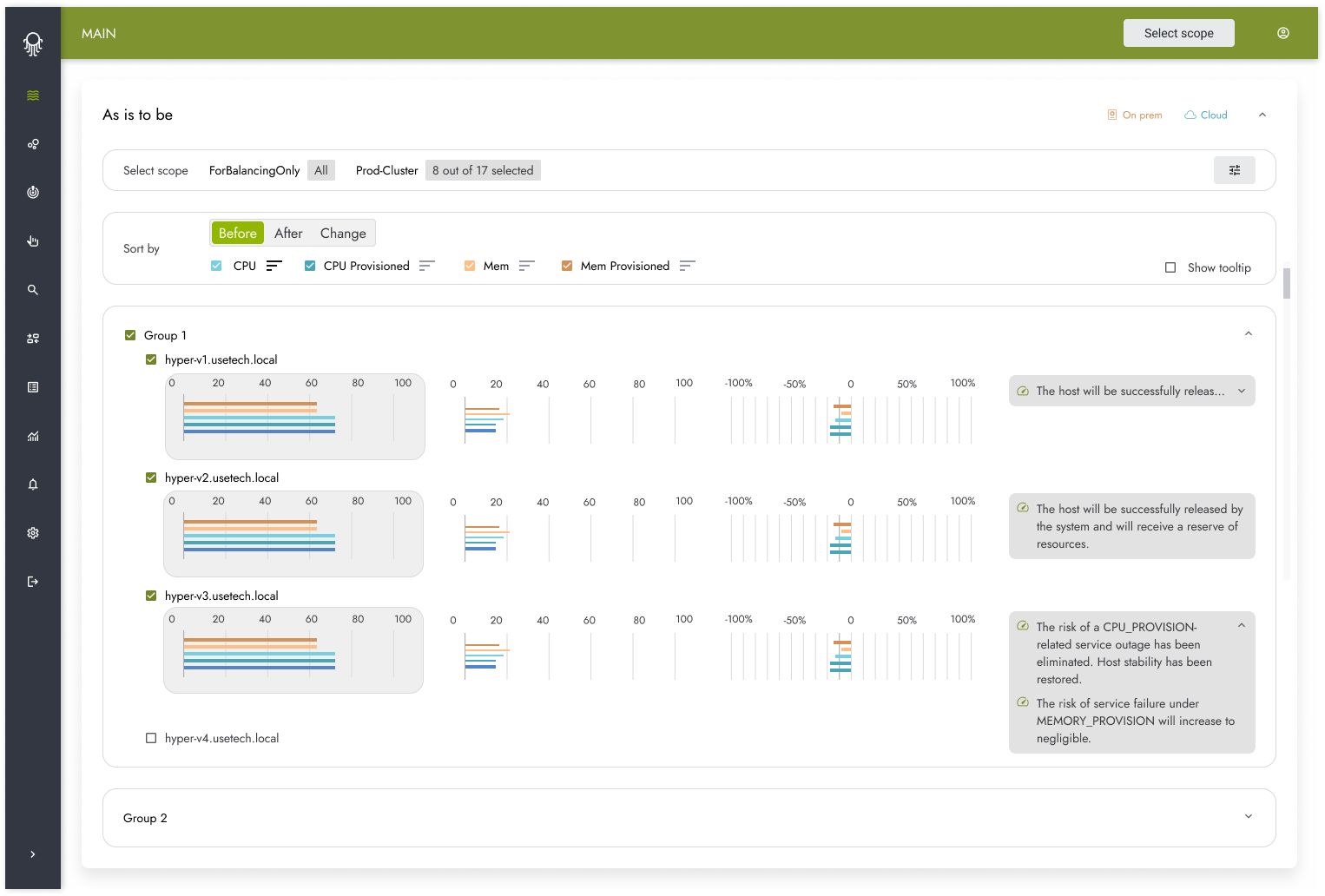
- Spread distributes VMs more evenly across hosts to reduce local overload.
- Compress consolidates workloads onto the minimum necessary number of hosts, releasing capacity for maintenance, modernization or energy-saving measures.
- Custom lets teams configure policies around their organization’s operating requirements.
Consolidation can help reduce energy consumption when released hosts can be placed into an appropriate lower-power state. Performance and availability requirements determine how far the team can consolidate workloads.
Octopus uses historical VM data to build individual consumption models for CPU, memory and disk resources. These models support demand forecasts and recommendations for reducing excessive allocations, while helping teams spot emerging resource shortages earlier.
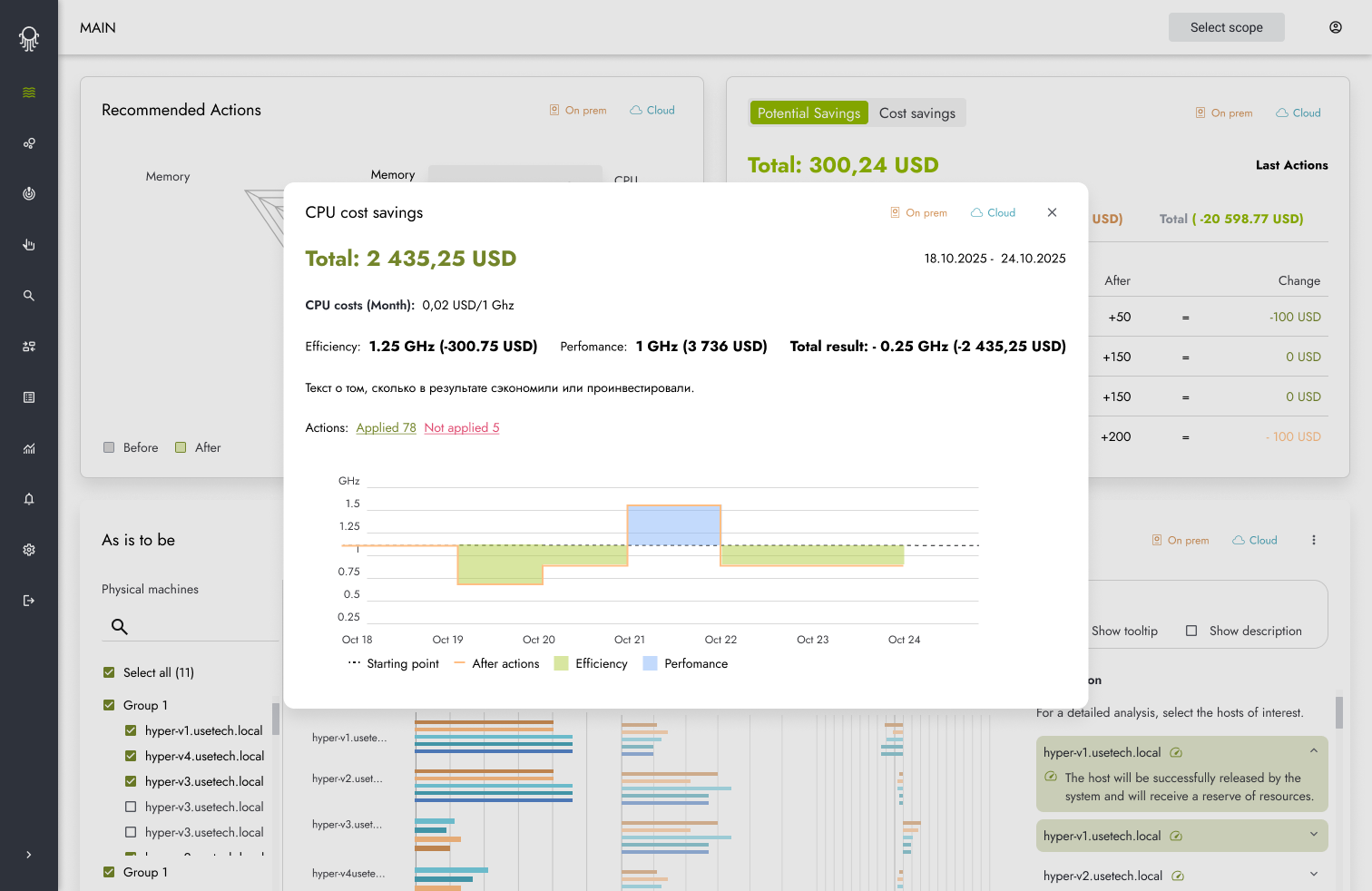
The platform also identifies VMs with prolonged inactivity and shows how long they have been inactive. Before-and-after reports help teams assess changes in consumption and available capacity. Automatic and semi-automatic balancing options let them choose an approach that fits their operating requirements.
For a closer look at how ML supports workload analysis and capacity planning, join our webinar on machine learning for data center operations, which includes a live Octopus demo. Session details and registration are available on the webinar page.
Infrastructure optimization results from existing deployments
The original Usetech article published on TAdviser reports results from two deployments.
At a state nuclear energy corporation, workload spikes were affecting data center stability. Octopus was introduced into an environment with 494 virtual machines and 38 physical servers. Reported results included a 40% reduction in resource shortages, the movement of 86% of VMs out of resource-related risk zones, and a 30% improvement in resource-use efficiency.
At a large energy company with 5,500 virtual machines, workload redistribution eliminated critical overloads. Consolidation was associated with a reported 4% improvement in data center energy efficiency.
These results belong to specific projects. What another organization can achieve depends on its workload patterns, existing utilization and operating constraints. An infrastructure assessment helps establish which opportunities apply to its own environment.
Start with a virtual infrastructure assessment
The assessment described in the original article starts with deployment on a dedicated VM, connected to the relevant hypervisors and monitoring systems. During an initial two-week period, Octopus collects and analyzes virtual infrastructure data to model consumption and identify potential improvements.
The team receives recommendations for redistributing workloads, a view of inefficiently used resources and an estimate of the potential effect. Monthly processing, seasonal peaks or infrequent critical workloads may require additional historical data or a longer assessment.
For MENA organizations, the recommendations should also reflect each workload’s permitted locations, resilience requirements and local operating responsibilities. The assessment gives the team a basis for deciding whether to right-size VMs, rebalance workloads or expand capacity.
Explore Octopus and discuss an infrastructure assessment